Install and switch on.
Install from the App Store. KDM loads all 160 Kuwait areas automatically and syncs your rates into your Kuwait shipping zone or market. Turn on the KDM app embed in the theme editor once. No theme code to edit.
Kuwait Delivery Manager charges per-area rates in KWD, lets customers pick a delivery date and slot before they pay, and runs bilingual EN/AR. Switch on the app embed. No theme code to edit.
KDM is a Shopify app made by Falaq Solutions for Kuwait commerce. It sets per-area shipping rates in KWD, lets customers pick a delivery date and time slot in a storefront popup (and on the checkout page for Shopify Plus stores), supports pickup, and runs fully bilingual EN/AR. It comes with 160 Kuwait areas loaded on install, syncs rates into your Kuwait shipping zone or market, hides Kuwait rates from international addresses, and runs on any theme through a theme app embed.
KDM connects Kuwait shipping rates, delivery windows, and the storefront popup into one Shopify-native flow.
Install from the App Store. KDM loads all 160 Kuwait areas automatically and syncs your rates into your Kuwait shipping zone or market. Turn on the KDM app embed in the theme editor once. No theme code to edit.
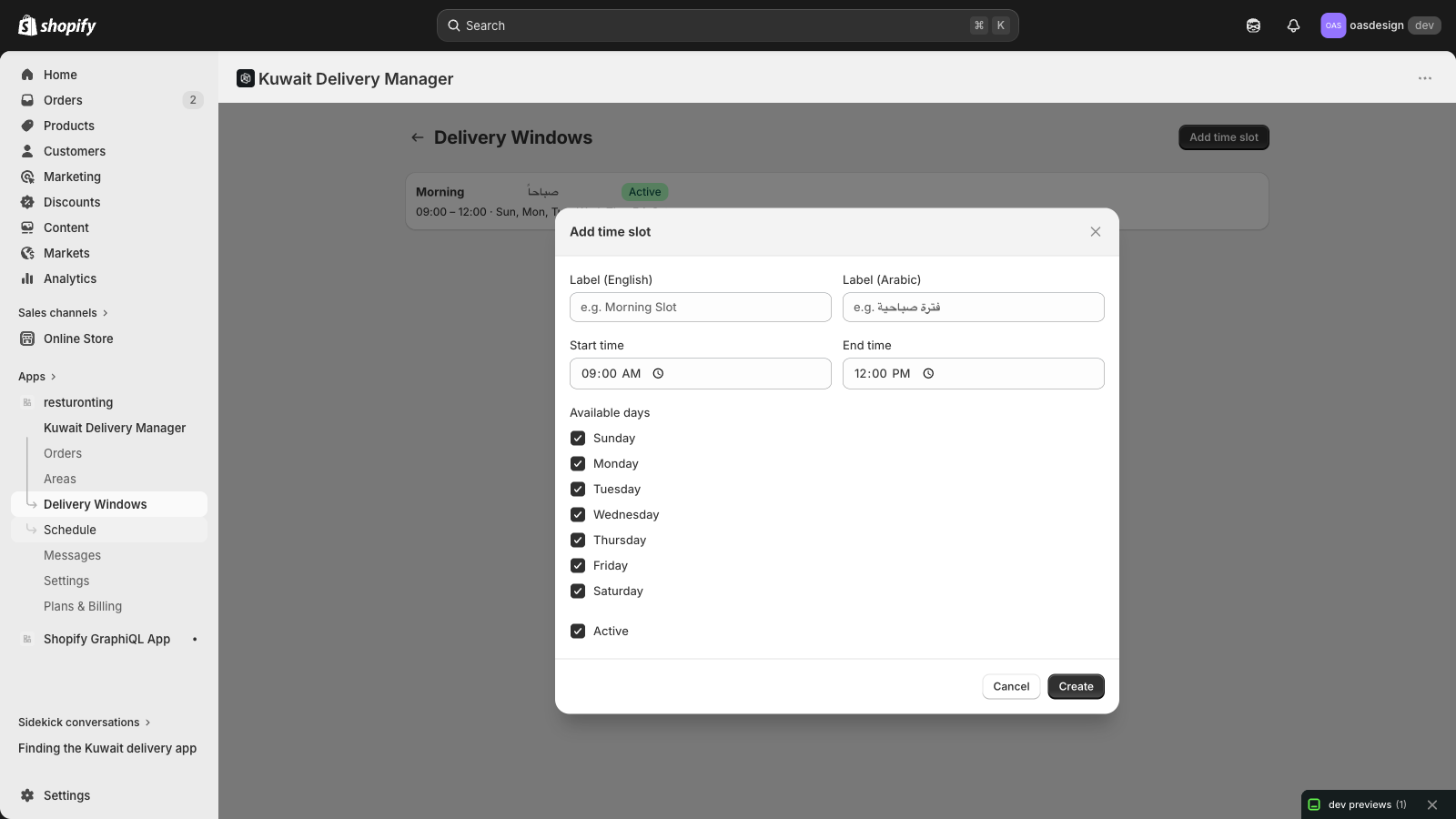
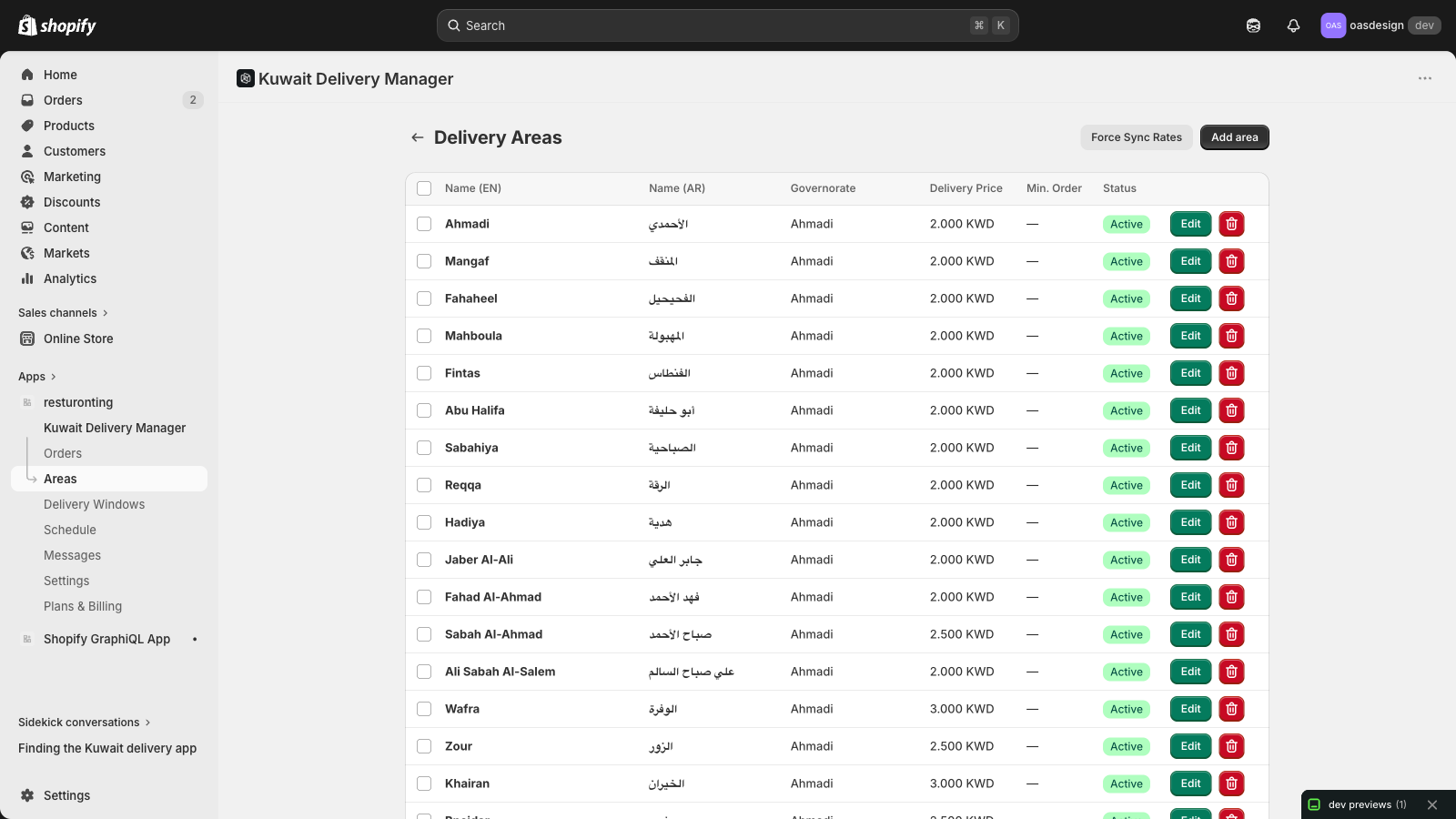
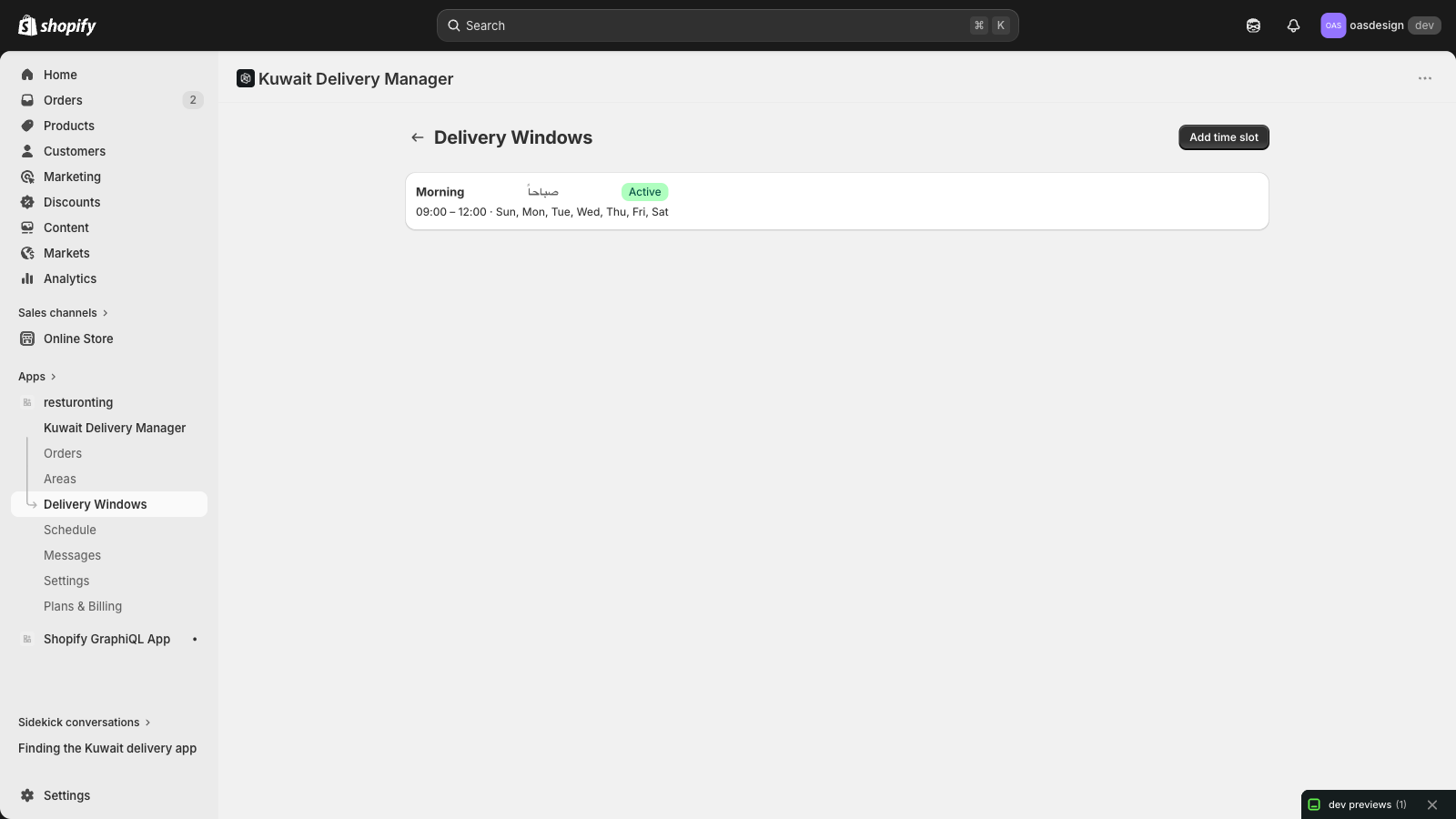
In KDM admin, set a delivery price per area in KWD. Add delivery windows (Morning, Afternoon, Evening) with active days, then set prep time, same-day cutoff and booking days in advance for your store. Block dates when you are closed.
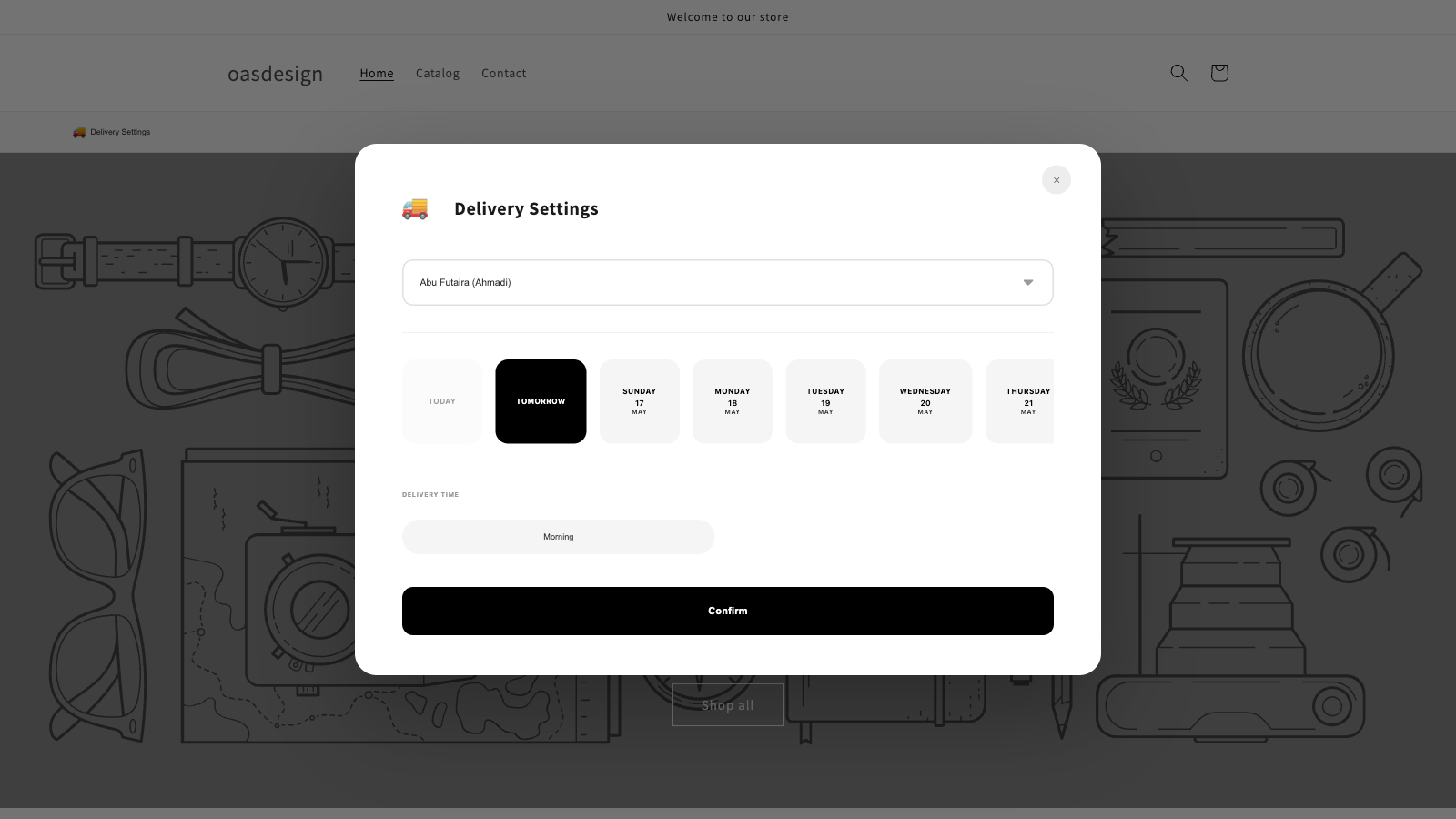
The bilingual popup opens when a shopper arrives, or only after they add something to the cart. Your choice. Customer picks governorate, area, date and slot. The selection is saved to the cart and the order, and the matching rate appears at checkout.
What Kuwait Shopify operators ask for first, and what keeps orders clean after launch.
Set a delivery price for every area. KDM syncs it into your Kuwait shipping zone, or into your Kuwait market on stores using market-based shipping. No carrier API.
Customers choose a delivery date and time window in the storefront popup, on every Shopify plan. On Shopify Plus you can also add the picker to the checkout page. The choice lands on the order.
Show the delivery popup when a shopper arrives, or only after they add a product to the cart. Shoppers can always open it from the delivery bar, and checkout will not complete until a delivery area is chosen.
Popup, area names and slot labels run in English and Arabic, and follow the storefront language. Area search works in both languages.
Returning shoppers see "Delivering to [area] · Change" and skip the picker. After 30 days KDM asks them to confirm their area, and they can change it from the cart at any time.
A checkout rule stops Kuwait orders that have no delivery area (or no slot, when slots are required) or the wrong shipping price for the area. Pickup, digital and international carts go through. Works without Shopify Plus.
KDM hides Kuwait rates from non-Kuwait addresses. International orders are labelled in Orders and kept out of your delivery schedule and slot counts. KDM warns you to move Kuwait into its own zone or market if it shares one with other countries.
Offer click-and-collect with a bilingual pickup address and instructions. Turn on time slots and cap deliveries per slot, and full slots stop taking bookings. Pro plan and above.
All six governorates and 160 areas load when you install, and you can add your own. Block holidays and closed days, and run the day from a delivery schedule with customer names.
Kuwait-ready from day one
Kuwait areas seeded on every install. From Kuwait City to Wafra industrial.
Pricing tiers, $0 to $82/mo. Start on the free plan.
Kuwait governorates covered, from Capital to Jahra.
Two languages, one admin, zero translation files.
All charges in USD, billed every 30 days through Shopify Billing.
5 deliveries / month.
50 deliveries / month.
200 deliveries / month.
Unlimited deliveries.
Yes. On stores using market-based shipping, KDM writes its rates into your Kuwait market. On older setups it syncs into your Kuwait shipping zone. Kuwait rates are hidden from non-Kuwait addresses, and KDM warns you if a Kuwait zone or market also includes other countries. If a sync fails, the reason shows on the Dashboard and Areas pages, with a Re-authorize button if new permissions are needed.
No. Turn on the KDM app embed once in the theme editor (the Dashboard links straight to it). KDM loads the 160 Kuwait areas on install (a Seed Kuwait areas button on the Dashboard restores them if they are missing) and syncs your rates. The cart "Delivering to … Change" link and the delivery bar are added by the app.
In KDM admin Settings, turn on Require delivery time slot selection, then set Max deliveries per time slot (0 = unlimited). When a slot is full for a date, it shows as unavailable in the popup (and in the checkout picker on Shopify Plus) and stops taking bookings. Pro plan and above.
Yes. Set how many days in advance customers can book, plus prep time and a same-day cutoff, in Settings. Block holidays or closed days and they disappear from the storefront calendar.
KDM auto-detects the storefront locale. On `/ar`, customers see the popup, area names, and slot labels in Arabic. The same admin handles both languages.
In a PostgreSQL database hosted on Fly.io, Frankfurt region. Encrypted at rest and in transit. Full disclosure in the privacy policy.
Yes — on the Enterprise plan. Upload your logo and pick primary and secondary brand colors in the KDM admin. The logo appears in the floating bar and popup header; the colors drive buttons, borders, hover and focus states across the storefront flow.
Operational delivery volume by area, slot, and governorate. Last 7 / 30 / 90 day windows with totals, average orders per day, delivery vs pickup split, top areas, top slots, and an upcoming-load chart for the next seven days. International orders are left out so the numbers reflect Kuwait deliveries.
Yes. In Settings, under Popup appearance, choose when the delivery popup appears: when the page loads (the default), or only after the customer adds a product to the cart. Shoppers can always open it from the delivery bar, and checkout will not complete until a delivery area is chosen. Buy it now and other dynamic checkout buttons skip the cart, so turn them off if you use this mode.
A KDM checkout rule checks that a Kuwait delivery order has an area (and a slot when slots are required) and that the shipping price matches the area. Pickup, digital and international carts are not affected, and if the area data KDM relies on is missing or invalid, checkout is allowed. It works on all Shopify plans. If the rule is turned off in Checkout rules, KDM warns you in the admin.
Five deliveries free every month. No theme code. One app embed to switch on.